
Scan, Order, Pay, Review: How QR Codes Are Changing the Restaurant Experience
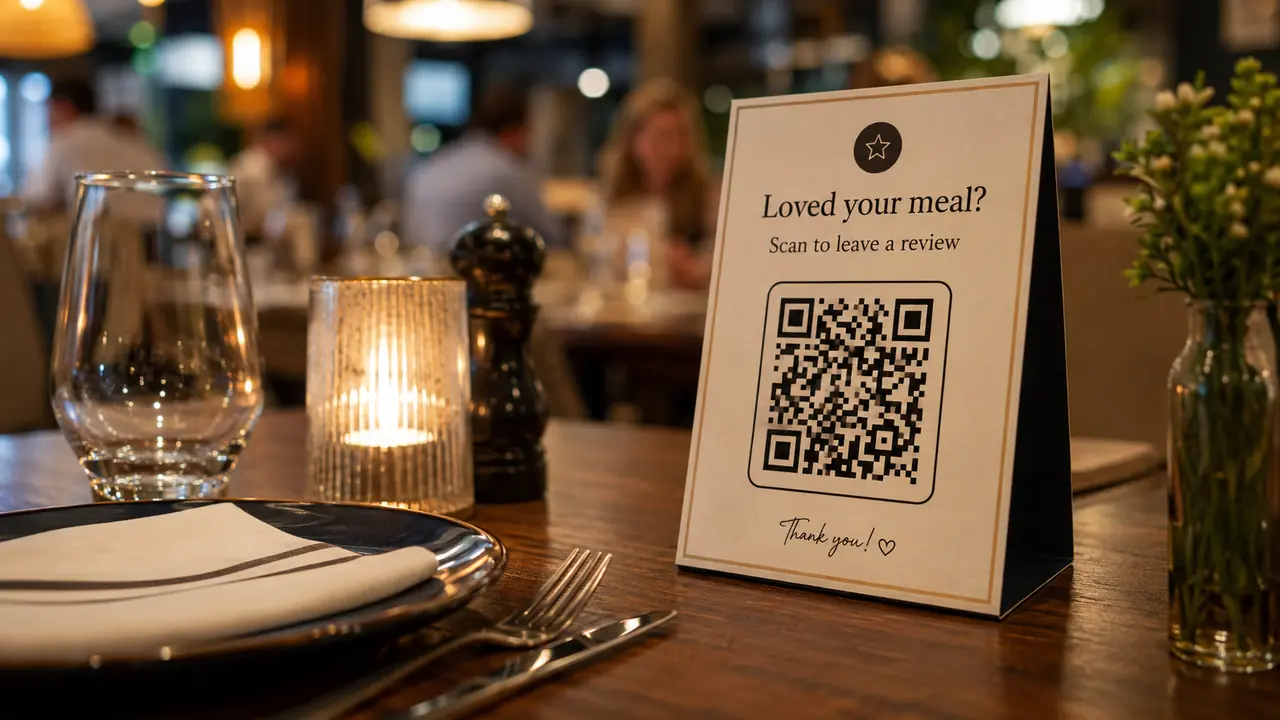
Restaurants have always been about more than food. They are about speed, atmosphere, convenience, trust, service, and that tiny emotional crisis when the server asks if you are ready and you absolutely are not.
QR codes now sit right in the middle of that experience.
A small code on a table, receipt, takeaway bag, window poster, menu board, or food package can do a lot: open a digital menu, help customers order, process payments, collect reviews, promote loyalty programs, share allergen details, and connect guests to social media.
The pandemic put QR codes on restaurant tables; what kept them there is more mundane - lower printing costs, instant menu updates, faster payments, and a review pipeline that actually gets used.
Used well, QR codes make the restaurant experience smoother. Used badly, they make people miss paper menus with the intensity of a Shakespearean tragedy.
Why QR Codes Work So Well in Restaurants
Restaurants are fast-moving environments. Menus change. Prices change. Specials sell out. Staff get busy. Customers ask the same questions again and again. Someone wants vegan options. Someone else wants to know if the sauce has peanuts. A table of six wants to split the bill in a way that requires advanced diplomacy.
QR codes help because they connect diners to useful information without forcing staff to explain everything manually.
A restaurant QR code can lead to:
- A digital menu
- Online ordering
- Table ordering
- Contactless payments
- Allergen information
- Nutrition details
- Customer reviews
- Loyalty signup
- Reservation pages
- Social media profiles
- Feedback forms
- Delivery options
- Catering inquiries
This does not mean QR codes should replace human service completely. Nobody wants to feel like they are dining inside a vending machine with mood lighting. But QR codes can remove repetitive friction, giving staff more time for hospitality and customers more control over the experience.
1. Digital Menus That Are Easy to Update
The most common restaurant use case is the digital menu.
A QR code on the table or counter sends customers to a mobile-friendly menu where they can browse dishes, prices, photos, ingredients, allergens, specials, and add-ons. This is especially useful for restaurants with seasonal items, rotating cocktails, limited-time offers, lunch specials, or changing availability.
A paper menu has one major weakness: once printed, it is frozen. If the salmon sells out, the price changes, or the chef decides the soup needs a dramatic new name, the printed menu becomes outdated.
A digital menu can be updated instantly. (That is the upside of a dynamic QR code: change the menu without reprinting the table tent.)
A restaurant like McDonald's regularly promotes limited-time menu items, app offers, and local variations. A smaller burger bar can borrow the same principle with a QR menu that highlights daily specials, removes unavailable items, and promotes combos without reprinting anything.
A café like Starbucks has seasonal drinks, food options, and customization. A local coffee shop may not need a global app, but it can still use a QR menu to show seasonal lattes, alternative milks, pastries, and loyalty offers.
What a Good Restaurant QR Menu Should Include
A digital menu should not simply be a PDF thrown online like a menu-shaped brick. It should be built for phones.
A strong QR menu usually includes:
- Clear categories
- Fast loading speed
- Readable dish names
- Prices that are easy to find
- Photos where helpful
- Ingredient notes
- Allergen information
- Dietary tags
- Add-ons and modifiers
- Specials or limited-time offers
- Language options when needed
- A simple path to order or ask staff
The menu should feel easier than paper, not like homework with appetizers.
If customers have to pinch, zoom, scroll sideways, or decode a scanned PDF from 2014, the QR menu is not doing its job.
2. Faster Table Ordering
QR codes can do more than show the menu. They can let customers order directly from the table.
This works especially well for casual restaurants, cafés, bars, food courts, hotel restaurants, fast-casual concepts, and busy venues where customers value speed. A guest scans the table QR code, chooses items, adds notes, sends the order, and sometimes pays immediately. (Running a mobile kitchen instead? See QR codes for food trucks.)
For restaurants, this can reduce pressure on staff during rush hours. For customers, it can remove waiting time.
Of course, table ordering should be designed carefully. Some diners enjoy talking to a server, asking questions, and getting recommendations. Others want to order fries with zero social interaction. Both groups deserve peace.
A restaurant can offer QR ordering as an option, not a forced ritual.
Think of fast-casual brands like Chipotle or Panera Bread, where digital ordering already fits the customer journey. A local noodle bar or pizza place can use the same idea at table level: scan, choose, customize, order.
The best QR ordering systems feel invisible. The customer is not thinking about the technology. They are thinking, "Great, my tacos are coming."
3. Contactless Payments and Split Bills
Payment is one of the most common points of friction in restaurants. The meal is done. The conversation is slowing. Everyone wants to leave. Then the bill arrives, and suddenly six adults become amateur accountants.
QR code payments can make this easier. (Here is how QR code payments work.)
A QR code on the receipt, table, or payment terminal can let customers open the bill, pay by card or mobile wallet, add a tip, request a digital receipt, or split payment. In some restaurants, each table has its own QR code connected to the order.
This can reduce waiting time and improve table turnover. It also gives customers more control.
Possible QR payment features include:
- Pay full bill
- Split evenly
- Pay by item
- Add tip
- Apply coupon
- Use loyalty points
- Request invoice
- Receive digital receipt
Brands like Toast, Square, and Clover have helped normalize digital restaurant payment flows for businesses of different sizes. A small café or bistro does not need enterprise-level complexity to benefit from QR payments. Even a simple scan-to-pay option can reduce staff workload during busy hours.
Paying should feel like the end of a good meal, not the beginning of a group project.
4. Collecting More Customer Reviews
Reviews are critical for restaurants. People check Google, Yelp, TripAdvisor, Facebook, and delivery apps before deciding where to eat. A restaurant with strong reviews looks trustworthy. A restaurant with no reviews feels like a mystery box with soup.
QR codes make review collection easier.
A restaurant can place a QR code on receipts, takeaway packaging, table cards, check presenters, counter signs, or follow-up emails. The code can lead directly to a Google review page, TripAdvisor profile, Yelp listing, or internal feedback form.
Good review CTAs are short and human:
- "Loved your meal? Scan to leave us a review."
- "Tell Google we fed you well."
- "Scan to rate your visit."
- "Help other hungry people find us."
- "Was the pasta worth telling strangers about?"
Timing matters. Ask after the meal, not before the first bite. A QR code on the receipt or takeaway bag often works well because the experience is fresh.
A brand like Shake Shack benefits from strong customer love and word-of-mouth. Local restaurants can build the same kind of social proof one review at a time.
5. Turning Negative Feedback Into Private Conversations
Not all feedback should go public immediately.
A smart QR review strategy can give customers two paths: public reviews for happy guests and private feedback for guests who had a problem. This helps restaurants fix issues before frustration turns into a one-star review written with the passion of a courtroom speech.
For example, a feedback page could ask:
How was your visit today?
- Great - leave us a public review
- Not great - tell the manager what happened
This structure gives unhappy customers a direct place to explain the issue. Maybe the order was late. Maybe the fries were cold. Maybe the table wobbled like it had a secret. The restaurant can respond, apologize, offer a solution, and learn from the problem.
Private feedback is not a way to hide criticism - it is a chance to fix the problem while the customer is still yours. A guest who feels heard may still come back.
A Simple QR Code Setup for a Restaurant
A restaurant does not need to launch everything at once. A clean system is better than a chaotic one.
Start with four QR codes:
- Menu QR code
Place it on tables, counters, and window signs. - Payment QR code
Place it on receipts or table payment cards. - Review QR code
Place it on receipts, takeaway bags, and check presenters. - Loyalty QR code
Place it on receipts, packaging, and near the exit.
Then measure performance. (Here is what QR code analytics can tell you.)
If menu scans are high but orders are slow, improve the ordering flow. If review scans are low, change the CTA or placement. If loyalty signup performs well on receipts, add it to takeaway packaging too.
QR codes are not "set and forget." They are "scan, learn, improve."
Less poetic, more profitable.
When Restaurants Should Not Use QR Codes
QR codes are useful, but they are not always the best answer.
Do not use QR codes to hide essential information. Do not force customers to scan for basic prices. Do not remove all human service from a restaurant that sells hospitality as part of the experience. Do not assume every guest has a charged phone, stable internet, or comfort with digital tools.
A good restaurant still offers alternatives.
Paper menus can be available on request. Staff can still explain specials. Allergy questions should still be handled carefully. Payment should still be possible without a phone.
QR codes should increase choice, not remove it.
Future of QR Codes in Restaurants
QR codes will likely become more integrated with restaurant systems. They may connect menus, ordering, payments, loyalty, kitchen operations, customer profiles, delivery apps, reviews, and marketing campaigns.
A table QR code could eventually support the whole visit: browse the menu, order, request service, pay, tip, review, and receive a personalized offer for next time.
For large brands like Starbucks, Domino's, or Chipotle, digital ordering and loyalty are already central to customer behavior. For independent restaurants, QR codes offer a simpler entry point into the same digital relationship.
The point is not replacing servers with screens - it is giving restaurants more flexible ways to serve guests. Technology should support hospitality, not steal its chair.
Ready to set a table code? Create a free menu QR code for your tables, or one for payments and reviews, in a couple of minutes.