
Wi-Fi QR Codes for Cafes, Hotels, and Offices: Placement, Sizing, and Security
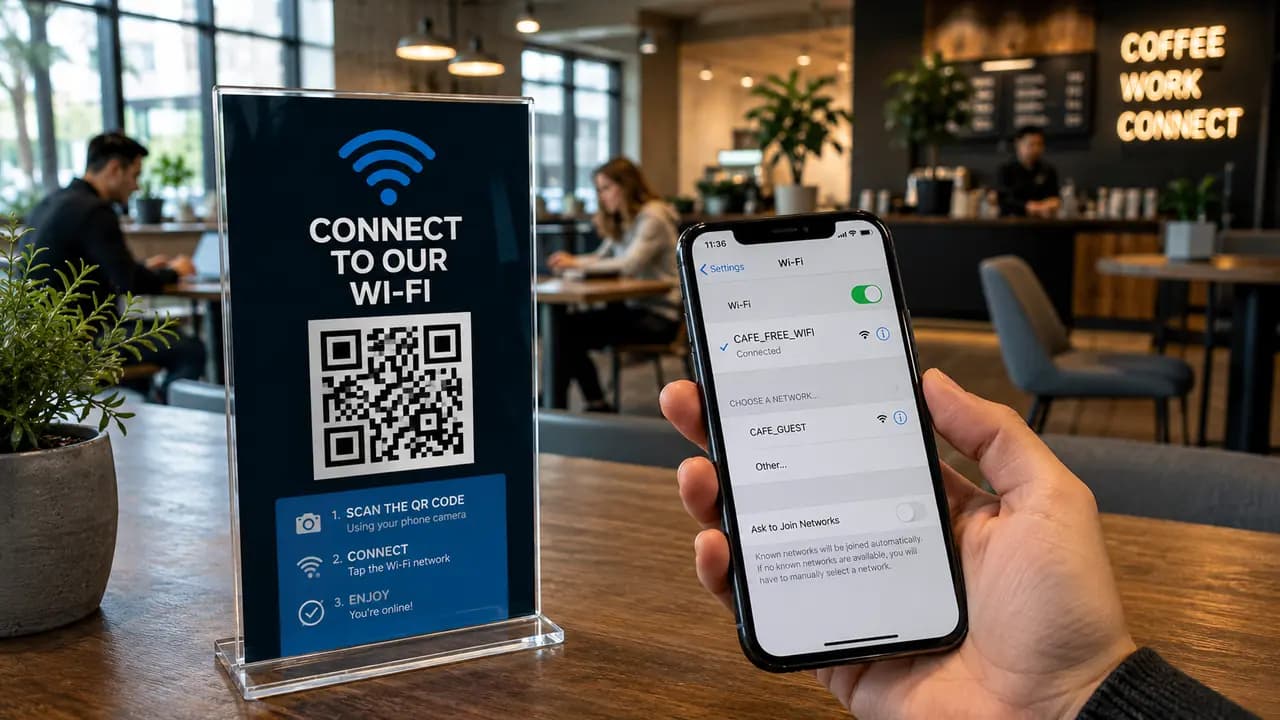
Wi-Fi access is one of those small service details that quietly shapes how a place feels. A guest walks into a café, office, hotel room, salon, clinic, coworking space, or event venue and asks the same familiar question: what is the Wi-Fi password? Then comes the routine. Someone points to a sign, reads the password aloud, writes it on a napkin, or repeats a long string of capitals, numbers, and symbols. One mistyped character and it all starts over. A Wi-Fi QR code removes most of that friction, and this guide walks through where to place it, how large to print it, and what security details to settle before anything goes to the printer.
Why Wi-Fi QR Codes Are Different From Other QR Types
Most QR codes send someone to a destination. A website code opens a page, a PDF code opens a document, a menu code loads a food list. A Wi-Fi QR code does something more direct: it hands the device the network name and password so the user can connect without typing anything. The camera reads the code, the phone offers to join the network, and the guest confirms. Nothing opens in a browser and there is no page to load - the exchange happens entirely in the phone's built-in network prompt, which is what makes the connection feel instant.
That immediacy is what makes Wi-Fi codes so practical in service settings: no spelling out of characters, no repeating the password for the fourth time while a line builds at the counter, and no confusion between similar-looking characters. For a business, that is one less recurring interruption during the busiest hours.
Faster and More Reliable Than Typing a Password
The core advantage of a Wi-Fi QR code is speed combined with accuracy. Manually entering a modern Wi-Fi password is slow and error-prone, especially when the password mixes uppercase and lowercase letters, digits, and symbols. Characters like the letter O and the number 0, or a lowercase l and the number 1, are easy to confuse on a printed card. Scanning sidesteps all of that. The device receives the exact credentials, so the guest connects on the first try instead of guessing.
This matters most in places where passwords are long or complex, which is exactly where good security practice pushes them. A strong guest password is harder to type but just as easy to scan. The QR code lets a business keep a serious password without punishing guests for it.
There are secondary benefits worth naming. Staff no longer have to say the password out loud across a room, which is a small privacy win in cafés, salons, and receptions where credentials otherwise get repeated openly all day. The connection process also simply feels more modern and less clumsy, which reflects on the venue.
Cafes and Restaurants: Table Cards
A café is close to the ideal setting for a Wi-Fi QR code. Guests are already seated, usually with a phone in hand, and connecting is a natural next step after sitting down. A small card on the table turns that into a single motion: sit, scan, connect, browse.
The cards that work best carry three elements together - a Wi-Fi icon, a short instruction, and the code itself. A line such as "Scan to connect to Wi-Fi" tends to outperform a card that shows only the network name and a bare square, because people scan faster when they do not have to work out what the square is for. Many venues pair it with a menu code on the same table card, which keeps the table tidy and puts both actions in one place. For restaurants and cafés, the value is mostly operational: staff field fewer password questions and guests get online without waiting for help.
Hotel Rooms
Hotel rooms suit Wi-Fi QR codes well because guests often connect several devices after arriving - a phone, a laptop, sometimes a tablet - and they do it with time and privacy rather than in a queue. A room card can sit beside the key-card holder, the welcome note, the TV guide, or the room-service menu.
A strong hotel-room card follows a simple structure: network name, QR code, a short instruction, and a small fallback password printed below. That fallback earns its place because not every device handles Wi-Fi QR scanning the same way.
Why a Fallback Password Still Helps
A Wi-Fi QR code should reduce typing, not lock out anyone who cannot scan. Some guests carry older phones, some use laptops or work devices with camera restrictions, and some simply prefer to type. The code should be the primary action and the plain password the backup. A card that covers both looks something like this:
- QR code for phones and tablets that can scan it.
- Plain-text password for laptops and devices that cannot.
- Network name printed clearly for manual selection.
- A one-line instruction for guests who are unsure what to do.
Keeping the printed password alongside the code consistently produces fewer support questions than a QR-only card, at almost no cost to the design.
Offices: Reception and Meeting Rooms
Office visitors tend to need Wi-Fi for a specific reason - a presentation, a call, or pulling up a shared document during a meeting. A code at reception helps, but the more useful spot is often inside the meeting rooms themselves, because visitors usually realize they need the network after they have sat down and opened a laptop, not while they are checking in at the door.
The practical adjustment is to place the code where the need actually appears rather than only at the entrance. A few notes for meeting-room placement:
- Put one QR card near the screen or the conference table.
- Point it at a guest network, never the internal staff network.
- Print it large enough to scan comfortably from a seated position.
- Include the network name under the code.
- Review and rotate guest passwords on a regular schedule.
Of those five, the guest-network line is the one to treat as non-negotiable. A scannable code that points at the internal network hands every visitor a shortcut into systems that were never meant for them, and the ease of scanning only widens that exposure.
Security: The Part Businesses Should Not Ignore
A Wi-Fi QR code encodes real network credentials. That is what makes it convenient, and it is also why a printed code should be treated as access information rather than decoration. The code itself is only as safe as the network it connects to.
For any public-facing place, the safest arrangement is a separate guest network. That network should not reach internal business systems, payment terminals, private files, or staff-only tools. Because a QR code lowers the barrier to connecting, the network behind it needs to be built for that ease from the start.
Security Checklist for Wi-Fi QR Codes
- Use a separate guest Wi-Fi network for anything customer-facing.
- Do not encode private staff-network credentials for public visitors.
- Change guest passwords regularly.
- Reprint and replace the QR cards whenever the password changes, so old cards do not linger with dead credentials.
- Place codes only where access is actually intended.
- Label the code clearly so users know they are joining Wi-Fi, not opening a random page.
Every item on this list is either a one-time setup decision or a step that folds into routine password maintenance, and none of them change how the code behaves for the guest who scans it.
Coworking Spaces
Coworking spaces pose a different problem, because members move between desks, call booths, meeting rooms, and shared lounges throughout the day. A single sign at the front desk is easy to walk past and forget. Distributing the code helps more than concentrating it in one place.
A reasonable setup uses a few placements together - reception, meeting rooms, and shared desks - so the code is nearby whenever someone needs it and nobody has to remember where the password was posted. Multiple placements do not feel excessive here, because reconnecting is a repeated need rather than a one-time event.
Events
Events are the trickiest case. Attendees are moving, distracted, and often trying to connect in the minute before a session starts. Wi-Fi codes can work on attendee cards and badge inserts, but print size becomes the deciding factor.
Very small codes on badge inserts scan inconsistently, especially when there is not enough quiet space around them. Glossy badges and plastic sleeves add glare on top of that. The reliable approach at events is a large code on welcome signage where people gather, with a smaller backup code on attendee cards for convenience rather than as the main path.
Recommended Wi-Fi QR Sizes by Placement
Size should follow the scanning distance. A code that reads fine on a desk can be far too small on a wall. The sizing logic is the same as for any printed QR code: treat two centimeters per side as the absolute floor and grow from there as the viewing distance increases.
- Table card: roughly 2.5 cm to 3.5 cm.
- Hotel room card: roughly 3 cm to 4 cm.
- Meeting-room sign: 4 cm or larger.
- Desk sticker: about 2.5 cm minimum.
- Event poster: 5 cm or larger.
- Badge insert: only if there is room for at least 2.5 cm plus a clean quiet zone around it.
Whatever the size, leave a clear margin of blank space around the code. A cramped code with no quiet zone fails far more often than a slightly small one with breathing room.
Designing a Card That Works on Every Device
The temptation is to print the code alone for a clean look. In practice that leaves out anyone on a laptop or a device that cannot scan, and some of them end up scanning with a phone just to copy the password over by hand, which throws away the convenience the code was supposed to provide.
A card that serves mixed-device environments usually includes all of the following:
- Headline: something plain like "Guest Wi-Fi".
- Instruction: "Scan to connect".
- QR code: large, centered, high contrast, with a clear quiet zone.
- Network name: visible directly under the code.
- Password backup: smaller text, but still readable.
- Support note: a short line inviting guests to ask staff if they need help.
A card built this way still reads clearly at a glance, and it covers the guests who cannot scan or would simply rather type the password in themselves.
Fewer Interruptions for Staff
In cafés, salons, offices, and hotels, Wi-Fi questions are small but relentless, and staff may answer the same one dozens of times a day. A Wi-Fi QR code does not replace hospitality; it removes a routine interruption. Staff are still there to help when a guest genuinely needs it, but most people can connect on their own.
That gap shows up most during rush periods. A barista taking orders, a receptionist greeting visitors, or a front-desk clerk handling check-in should not have to spell out a password again and again when a simple card handles it.
Where Wi-Fi QR Codes Should Not Go
A Wi-Fi code is convenient precisely because it lowers the barrier to connecting, which is also why placement has to match the access policy. A code that is only meant for customers or guests should not be visible from the street, a lobby window, or a public hallway where anyone can scan it in passing. A few things to avoid:
- Do not put private-network codes anywhere the public can see them.
- Do not keep reusing old printed cards after a password change.
- Do not place a code where it can be easily photographed by people who are not intended users.
- Do not run guests and internal business tools on the same network.
Match the placement to who the network is for, and separate guest traffic from anything sensitive.
How the Benefit Changes by Business
The setting changes but the underlying gain stays the same. Restaurants and cafés cut down on password questions and make guests more comfortable. Hotels smooth out the first few minutes after arrival. Offices simplify guest access before meetings. Coworking spaces support people moving freely between rooms. Clinics and salons make waiting time easier. Events help attendees get online quickly without hunting for a staff member. In every case the result is less typing, fewer errors, and faster access.
Getting It Right
The strongest version of a Wi-Fi access card is rarely the code on its own. It pairs a large, high-contrast QR code with a short instruction, the visible network name, and a readable backup password, and in any public location it points at a guest network rather than a private internal one. Get those pieces right and connecting becomes a single scan instead of a small daily annoyance.
Setting one up takes a few minutes: enter the network name and password, print the card, and test it on a couple of different phones before it goes on display - after confirming, one last time, that the network behind it is the one meant for guests.