
What Is a QR Code Generator and How Does It Work?
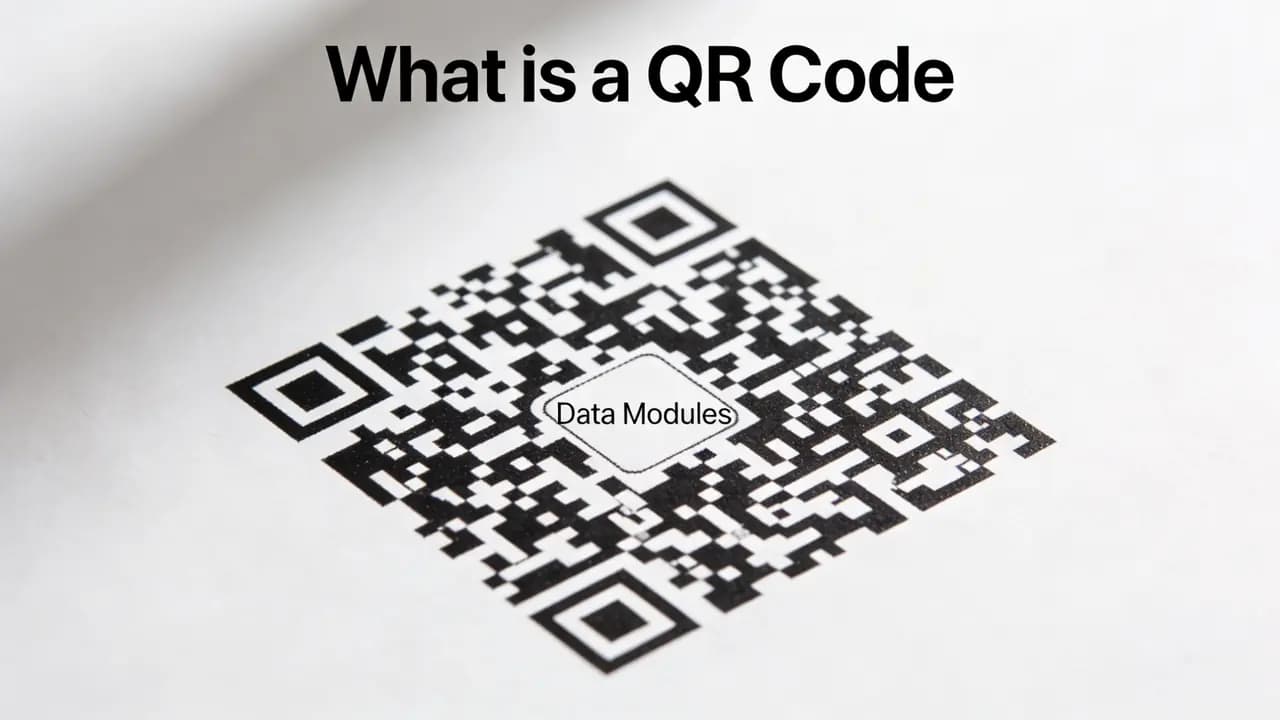
Scan a QR code on a restaurant table and the menu appears. Scan one on a cereal box, and you're watching a promotional video. Point your phone at a business card and a contact is saved. The codes themselves look identical - same black-and-white grid, same square shape - but what's inside each one is completely different. That variety is exactly what makes QR code generators worth understanding.
The tool itself
A QR code generator converts information into a scannable image. Feed it a URL, a phone number, a block of text, or Wi-Fi login details, and it produces a square matrix that any modern smartphone camera can read. The person scanning never types anything - they just point and the device handles the rest.
The output is an image file. The image looks like a random pattern of black and white cells, but it isn't random at all - every cell is determined by the data you put in and the encoding rules the format uses.
Reading the code: what your phone is doing
Most people treat scanning as something passive, like taking a photo. The device is actually doing more than that.
First, it locates the three large squares sitting in the three corners of the code. Those are position markers - they tell the phone where the code starts, how it's rotated, and what scale to use when reading. Without them, the rest of the matrix would be unreadable.
From there, the algorithm sweeps across the grid, reads the pattern of dark and light cells, and decodes them back into the original data. Once it has the data, the phone decides what to do with it: follow a link, pull up contact details, or connect to a network.
The reason QR codes work from odd angles or at a distance - something regular barcodes can't manage - is a combination of that corner-marker system and the error correction built into every code.
Inside the generator
When you create a QR code, the generator runs through a defined sequence.
You start with input: whatever information you want the code to carry. That might be a specific URL, an email address, a phone number, a plain text note, or credentials for a Wi-Fi network.
The generator then encodes that input into binary data. It follows international standards for this, which is why a QR code made on one platform scans correctly on any device anywhere in the world.
That binary data gets laid out across a grid. The grid is mostly data modules - individual cells that represent the encoded information - but it also includes the structural elements that make the code readable: position markers in the corners, smaller alignment markers that help with curved or damaged surfaces, and timing strips that establish the grid's proportions.
Before the image is finalized, the generator applies error correction. This is the step most people don't know about. The encoder deliberately stores redundant copies of the data, scattered across the matrix. If part of the printed code later gets wet, scratched, or partially covered, say, a logo placed in the center, the device can recover the missing data from what remains. At the highest correction setting, a code can lose up to 30% of its surface and still scan correctly.
The finished file comes out as PNG for screens or SVG for print.
Two types, one important difference
Every QR code is either static or dynamic, and the distinction has real consequences.
In a static code, the actual destination data lives inside the matrix. Print it on ten thousand flyers and it will always point to the same place. Change your website, end the promotion, move the file, the code becomes useless and needs to be replaced.
A dynamic code works differently. The matrix contains only a short redirect address. Where that redirect leads is stored in a platform you control, and you can change it at any time without reprinting anything. Dynamic codes also log scan events: when, how many times, on what kind of device, from what general area. That data is useful for anyone running a campaign or trying to understand how people are engaging with printed materials.
Neither type is universally better. Static codes are simpler and require no ongoing account or platform. Dynamic codes make sense whenever the destination might change or the performance data is worth having. If you're weighing the two for a specific project, our breakdown of static vs dynamic QR codes goes deeper into when each one fits.
Practical uses that actually hold up
Some use cases for QR codes are genuinely practical, and others are more about following a trend. You can see where QR codes actually show up in everyday life for the full picture, but these are the ones that have stuck:
Menus. Updating a linked PDF costs nothing. Reprinting laminated menus costs something every time. This is why a lot of food businesses moved to QR menus and stayed there.
Packaging. A product label has limited space. A QR code on the label can lead to the full instruction manual, a video walkthrough, or a page of certifications that would never fit in print.
Ticketing. QR-based entry removes the need for physical tickets and works faster at the door than most alternatives.
Contact sharing. A QR code on a business card encodes a full contact record. One scan and it's saved - no typing a name and number and hoping for no typos.
Network access. Sharing a Wi-Fi password through a QR code is faster and less error-prone than reading it out or writing it down.
What to check before you publish
A few things go wrong often enough to be worth mentioning.
Contrast matters more than people expect. A dark code on a white background scans easily. That same code on an off-white, beige, or textured background can fail, especially indoors. Test on the actual surface and under the actual lighting conditions where it will be used.
Size affects scan distance. At around 2 by 2 centimeters, a code is readable up close. Smaller than that and anything beyond arm's length becomes unreliable. For large-format print - posters, signage, packaging - scale the code up accordingly.
Position markers must be clear. If you're placing a logo over the code, keep it away from the three corners. Those squares are not decorative. Covering any one of them makes the code significantly harder or impossible to read.
For codes that will be outside or handled frequently, set the error correction to the highest level before generating. It makes the file slightly more complex but gives the code much better durability.
Once you know how the pieces fit together, making one takes seconds. Follow our step-by-step guide to creating a QR code, or generate one right now - no sign-up required.